Introduction
Welcome to Your SEO Learning Journey
SEO basics means understanding how to improve your website so it appears in relevant Google searches. Search engine optimization is the process of improving content, website structure, and technical setup so search engines can understand, crawl, index, and rank your site for the right audience. To learn and apply SEO more effectively, many beginners explore different Group Buy SEO Tools platform for keyword research, website audits, rank tracking, and competitor analysis.
In simple terms, SEO helps your website get traffic from organic search. This means you can build visibility without relying only on paid ads for every click.
This guide is useful for beginners, bloggers, business owners, marketers, and website managers. If you are starting a new website, improving existing pages, or trying to increase rankings and conversions, SEO basics gives you a strong foundation.
In this guide, you will learn the definition of SEO basics, how search engines work, keyword research, quality content, on-page SEO, technical SEO, link building, mobile SEO, local SEO, product SEO basics, and measuring SEO success.

Quick Start Guide to SEO
If you want a short path to get started, focus on the basics first.
Start by checking whether Google can access and index your website. Google Search Console is very useful for this. It shows which pages are indexed and which ones have issues.
Next, begin keyword research. Choose one primary keyword, then identify related secondary keywords and search intent. This matters because content only ranks well when it matches what users are actually searching for.
The next step is on-page optimization. This includes title tags, meta descriptions, heading tags, page URLs, images, alt attributes, and body content. Every page should have a clear topic and should directly answer the user’s need.
Then review your technical setup. Make sure HTTPS is enabled, Robots.txt is correct, your XML sitemap is submitted, your site is mobile-friendly, and your Core Web Vitals are in good shape. Fast pages and a clean structure improve both user experience and search visibility.
After that, add internal links so your important pages are connected. This helps Google understand your site structure and helps users find the next relevant page.
Finally, set up Google Analytics and Google Search Console. These tools help you track organic traffic, keyword rankings, engagement time, conversions, and index coverage.
How Much of This Guide Do You Need to Read?
If you are a complete beginner, it is best to read the full guide. That will give you a clear picture of SEO marketing and help you connect all the main parts.
If your website is already live, focus more on the sections about indexing, quality content, on-page SEO, technical SEO, and internal linking.
If your main goal is to improve rankings, pay extra attention to keyword research, search intent, title tags, meta descriptions, body content, and link building.
If you want to turn traffic into leads or sales, focus more on user experience, calls to action, engagement time, conversions, and Google Analytics reporting.
What Is SEO and Why Is It Important?
SEO Basics Definition
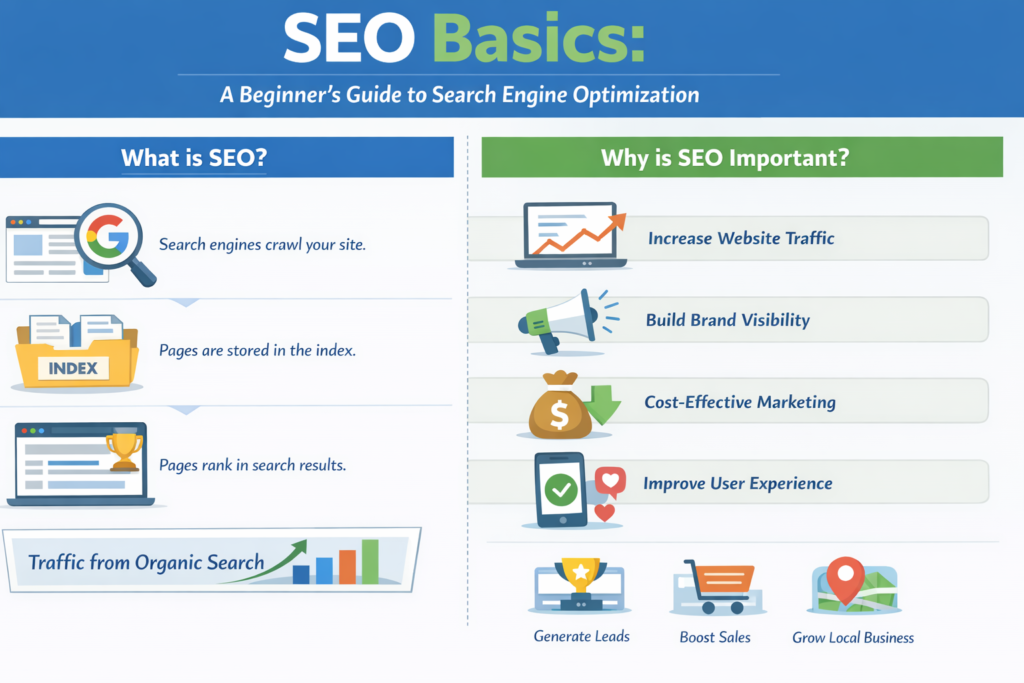
SEO basics means improving your website for both search engines and users. Search engines like Google crawl pages, index them, and then rank them based on the user’s query.
Crawling means search engine bots discover pages on your website. Indexing means those pages are stored in the search engine database. Ranking means Google decides where those pages should appear in the search engine results page, or SERP.
Organic search is the traffic that comes from unpaid search results. It is one of the strongest long-term sources of website growth, which is why SEO basics matters for every website owner.
Why Should You Care About SEO?
SEO helps you attract organic traffic. It improves brand visibility. It can improve your website ranking over time. It can also become a lower-cost traffic channel compared with paid advertising, especially when your content is useful and your site is technically strong.
SEO is not only about rankings. It also improves user experience. Clear headings, better page speed, easy navigation, helpful content, and mobile usability all make your website more useful.
Why SEO Matters for Different Website Types
For business websites, SEO can generate leads and inquiries. For blogs, it can bring readers and steady organic traffic. For e-commerce websites, it helps category pages and product pages appear in search. For local businesses, local SEO can improve calls, visits, and map visibility. For service-based websites, it helps match services with real searches. Product SEO basics helps product pages appear in front of the right users.

Core SEO Basics You Need to Know First
How Search Engines Work
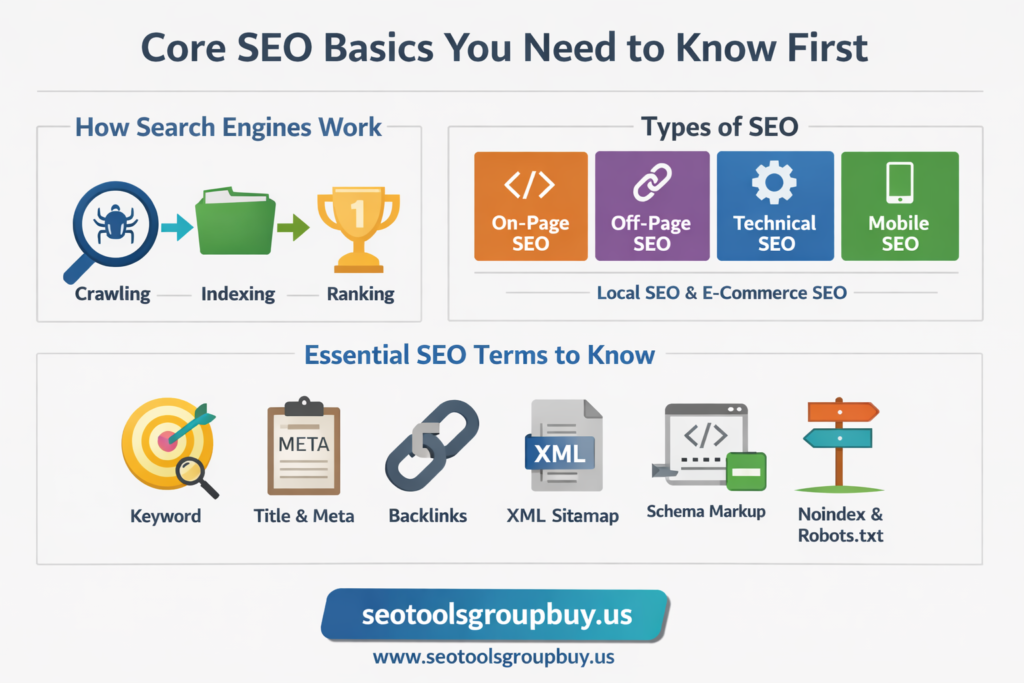
Search engines like Google follow a basic process. They crawl pages, index them, and then rank them.
Crawling means search engine bots move through links and discover pages on your website. If your site structure is weak, your internal links are poor, or important pages are blocked, crawling becomes harder.
Indexing means Google stores and understands your page. A crawled page does not always get indexed. If the content is thin, duplicated, blocked by Robots.txt, marked with noindex, or hard to render, it may not enter the index.
Ranking happens after indexing. Google looks at many signals to decide which page should appear first in the search results. These signals include relevance, quality content, user experience, internal links, backlinks, mobile friendliness, and page speed.
Search intent is a key part of ranking. If someone searches for “SEO basics,” Google usually prefers beginner-friendly educational pages, not service pages or sales pages. That is why your content should match what the user wants.
Search engine algorithms decide how pages are sorted. You do not need to know every update. You only need the basics: create useful content, make your site accessible, improve page quality, and build trust over time.
The Main Types of SEO
On-page SEO covers what is on the page itself. This includes title tags, meta descriptions, heading tags, body content, page URLs, images, alt attributes, internal links, and schema markup.
Off-page SEO focuses on signals from outside your site. The biggest part is link building. Backlinks from trusted websites can help build authority.
Technical SEO deals with the foundation of the website. It covers crawlability, indexability, Core Web Vitals, HTTPS, redirects, XML sitemap, Robots.txt, duplicate content, header response codes, and site performance.
Mobile SEO focuses on how well your site works on phones and tablets. Google uses mobile-first indexing, so this is now a core part of SEO basics.
Local SEO matters for businesses that serve a city or area. It includes Google Business Profile, local keywords, local citations, reviews, and location pages.
E-commerce SEO is for online stores. It focuses on collection pages, product pages, filters, faceted navigation, product schema, image optimization, and conversion-focused SEO.
Product SEO basics is useful for companies that need product pages to rank for specific searches. This includes product titles, descriptions, attributes, internal linking, and structured data.
Basic SEO Terms Beginners Should Know
A keyword is the word or phrase people type into a search engine.
Search intent is the reason behind the search. A user may want information, a product, a service, or a direct answer.
Title tags are the clickable titles often shown in search results. Meta descriptions are the short summaries below them. Heading tags help organize content. Page URLs should be clean and readable.
Alt text or alt attributes describe images. Internal links connect one page of your site to another. Backlinks are links from other websites to your site.
An XML sitemap helps search engines find important pages. Robots.txt gives crawling instructions. A canonical tag helps with duplicate content issues. Schema markup adds structured information to a page. Core Web Vitals measure loading, visual stability, and responsiveness. Conversions are the actions you want users to take, such as purchases, sign-ups, form submissions, or calls.
Why These Basics Matter First
Many beginners jump straight into publishing content. But strong SEO basic principles follow the right order. First, make sure your website can be crawled and indexed. Then match the page with the right keyword and search intent. After that, improve on-page SEO, internal linking, technical SEO, and then build authority.
That order saves time. It also prevents a common problem: publishing many pages that never rank because the basics were never fixed.
Tools and Resources
Google Search Console and Google Analytics are the first tools most beginners need. They are enough to start seeing real performance data.
Keyword research tools help you find search terms, related search queries, and topic variations. Page speed testing tools help you evaluate speed and Core Web Vitals. Crawl audit tools help identify broken links, redirect chains, blocked pages, and duplicate content. For deeper backlink analysis, competitor research, and keyword discovery, tools like cheap Ahrefs tools group buy can be useful.
Moz tools and Moz Pro can support rank tracking, site audits, keyword research, and competitive research. If someone wants to learn through structured training, Moz Academy SEO Essentials Certification can be useful, but it should not replace hands-on practice.
If you are working inside a company or institution, internal systems like MSU Tools and Communications Resources may matter. But for a general SEO basics article, these are optional resources, not core SEO requirements.
Get Started with SEO
Set Your SEO Goals
Before you change titles or publish content, decide what success means for your site.
Some websites want more organic traffic. Some want keyword rankings for commercial terms. Some want leads through forms or calls. Some want direct sales. Local businesses may want map visibility and more visits. A service company may want quote requests. An e-commerce website may want more product page traffic and more completed checkouts.
Your goals shape your SEO strategy. If the goal is traffic, focus more on informational content and topic coverage. If the goal is sales, focus more on commercial keywords, product pages, and conversion paths. If the goal is local visibility, build around local SEO basics.
Basic SEO Setup Checklist
Start with Google Search Console. It helps you monitor indexing, sitemap status, search queries, clicks, impressions, and page issues.
Then set up Google Analytics. It shows organic traffic, landing pages, engagement time, user behavior, conversions, and organic leads and sales.
Add an XML sitemap and submit it in Search Console. Check your Robots.txt file so you are not blocking important pages by mistake.
Use HTTPS. A secure site helps build trust and is now a standard part of any website.
Make sure your design is mobile-friendly. Pages should be readable on small screens, buttons should be easy to tap, and layouts should not break.
Use reliable hosting so your site loads well. Slow hosting affects page speed and user experience.
Check your CMS SEO settings. Make sure pages can be indexed, permalinks are clean, and duplicate archives are controlled. This matters whether you use WordPress, Sitecore XM Cloud, Sprinklr, or another system.
Run a basic indexability check. Confirm that key pages return a normal header response, are linked internally, and are not blocked or redirected in a harmful way.
Keyword Research for SEO Basics
Keyword research is the process of finding what people search for and matching those searches to useful pages.
The primary keyword for this article is “SEO basics.” Secondary keywords and supporting phrases can include basics of SEO, learn SEO basics, basic SEO best practices, basic SEO definition, basic SEO guidelines, basic SEO optimization meaning, basics of SEO content writing, basics of SEO writing, local SEO basics, ecommerce SEO basics, javascript SEO basics, and AI SEO basics.
You can find keywords from Google suggestions, People Also Ask, related searches, competitor pages, Search Console queries, and SEO tools. Platforms like seo group buy semrush can help you find keyword ideas, measure keyword difficulty, study search intent, and review competitor pages.
Choose keywords based on search intent match, relevance, traffic potential, keyword difficulty, and conversion value. A keyword with high volume is not always the best choice if it does not match the page purpose.
A simple keyword research process starts with a seed keyword. Then build topic clusters around it. Identify supporting keywords. Map each keyword to a page. Keep one primary topic per page. This makes your website structure cleaner and helps avoid duplicate targeting.
A Beginner SEO Plan That Makes Sense
Do not try to do everything on day one.
Start by checking indexing and technical basics. Then choose priority pages. Then improve titles, descriptions, headings, body content, URL structure, and internal links. After that, create useful new content and improve trust with link building and content marketing.
This gives beginners a simple path instead of random tasks.
How Google Finds and Understands Your Pages
How Do You Make Sure Google Can Index Your Site?
A page cannot rank if Google cannot index it. That is the first rule.
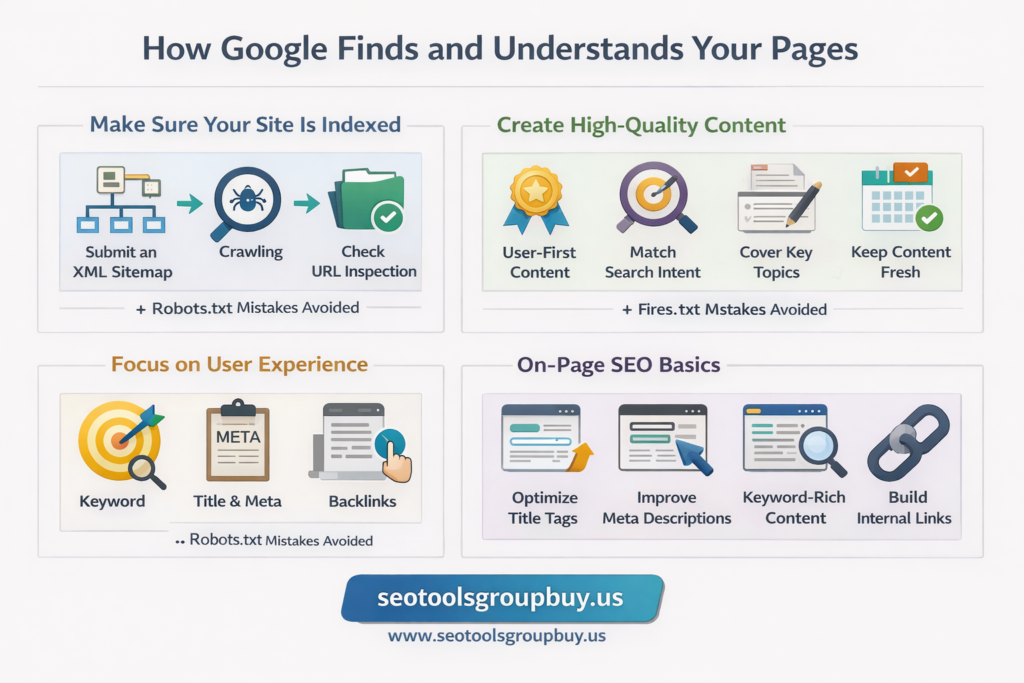
Your pages must be crawlable. That means search engine bots should be able to reach them through normal internal links and site navigation. Avoid orphan pages. These are pages with no internal links pointing to them. They are harder to discover and weaker in the site structure.
Use clean internal links and logical navigation. Make important pages easy to reach. Keep category hierarchy simple. Strong information architecture helps both users and search engines.
Robots.txt basics matter here. The file tells bots which areas they may or may not crawl. It should not block important content by mistake. Many beginners accidentally block useful pages or scripts and then wonder why indexing fails.
Noindex mistakes are another common issue. A page may be perfectly written, but if it has a noindex tag, it may stay out of search.
Submit and Maintain an XML Sitemap
An XML sitemap is a list of important pages that helps Google find your content. It does not force indexing, but it supports discovery and site management.
Submit the sitemap in Google Search Console. Then check whether key pages are included, whether old URLs are removed, and whether the sitemap stays updated as the site changes.
A sitemap works best when it includes indexable, canonical pages only. Do not fill it with broken, redirected, or low-value URLs.
Fix Common Indexing Blockers
Some pages fail to index because of avoidable issues.
Noindex tags can block pages directly. Blocked resources can stop rendering. Broken pages return errors. Duplicate URLs can confuse search engines. Redirect chains can waste crawl paths. Thin content may not be useful enough to rank.
Header response codes matter too. A 200 response is normal. A 301 redirect passes users and bots to a new page. A 302 is usually temporary. A 404 means the page is missing. A 500 means the server has a problem. These responses affect crawlability, indexing, and site health.
Use Google Search Console for Index Coverage
Google Search Console is one of the best tools for this work.
Use URL inspection to see how Google views a page. Review the page indexing report to find excluded pages. Check sitemap status and fix coverage issues early. This is often the fastest way to spot technical SEO problems before they hurt rankings.
Quality Content Comes Next
After indexing, content quality becomes the main factor.
Create high-quality content that matches search intent and covers the topic clearly. For a beginner guide, explain terms in simple language. Show the main uses of SEO basics, the main parts, and the steps people should take first.
Optimize the content that appears above the fold. The title, intro, and early paragraphs should tell the user they are in the right place. This helps both readability and engagement.
Write for users first and search engines second. Use natural language. Keep paragraphs short. Add examples. Break up long blocks of text. Use bullets, numbered lists, and short paragraphs where they improve readability.
Good body content includes topic coverage, semantic keywords, definitions, and practical examples. It should answer the main question early and then build the topic in a logical order.
User Experience and On-Page SEO Basics
User experience affects SEO because it affects how people interact with your site. If pages are hard to read, slow, or confusing, users leave faster.
Use clear calls to action where they make sense. A call to action should support the page goal. It should not get in the way of the content.
Clear navigation, readable fonts, simple page design, and visible trust signals all support usability.
On-page SEO basics are the direct controls you have on each page. Title tags should be clear and relevant. Meta descriptions should explain the page well. Heading tags should organize the content in a way that is easy to scan. Page URLs should be short and descriptive.
Images should use clear file names, good compression, and alt attributes that describe the image honestly. Internal links should connect related pages using clear anchor text. Schema markup can help search engines understand the page better and may support richer search visibility.
Body content optimization should place the keyword naturally, use related terms where relevant, and stay aligned with search intent. This is the core of SEO content writing basics.
Building Structure, Authority, and Technical Strength
Information Architecture and Internal Linking
Information architecture is the way your site is organized. It includes categories, subcategories, page groups, and how everything connects.
A clean structure helps Google understand what the site is about. It also helps users find the next useful page. Important pages should be close to the homepage. Related pages should link to each other. Supporting pages should connect back to stronger pillar pages.
Internal linking matters for crawlability, authority flow, user journey, and topic relevance. It helps move attention and value across the site.
Use descriptive anchor text. Link contextually where it helps the reader. Avoid over-linking. Give extra support to priority pages such as service pages, category pages, and important guides.
Topic clusters make this stronger. A pillar page targets a broad topic. Supporting pages cover narrower terms. Together they create stronger coverage and cleaner keyword mapping.
Link Building and Establishing Authority
Link building is the process of earning backlinks from other websites. These links can improve authority and trust signals.
One of the safest starting points is to build links from associations, suppliers, connected businesses, and real partner sites. Membership listings, trusted vendor pages, and industry relationships often provide relevant links.
Quality directories can help when they are real, local, or industry-specific. But spam directory submissions do more harm than good.
You can earn links from the press through digital PR. Expert quotes, useful data, industry stories, and real updates can attract mentions. Content that attracts backlinks usually includes original research, useful guides, statistics pages, free tools, templates, or case studies.
Avoid bad link building tactics. Paid spam links, link schemes, irrelevant directory spam, and exact-match anchor abuse create risk and usually age badly.
Content Marketing and Link Building
Content marketing supports link building when the content is worth sharing.
First, identify your linking and sharing audience. This may include journalists, bloggers, industry sites, communities, and resource curators.
Second, decide what assets you can create and how you will promote them. Content assets can be guides, examples, reports, templates, comparison pages, or tools. Promotion can include outreach, social sharing, partnerships, and republishing where appropriate.
Third, map your assets to specific keywords. Some content targets informational keywords. Some supports commercial intent. The best content marketing plan connects useful content, real promotion, and keyword alignment.
Technical SEO Basics
Technical SEO is the part of SEO that supports crawlability, indexability, performance, and site security.
Robots.txt should give crawling instructions clearly. Block pages that should stay private or low-value, but do not block key pages or files carelessly.
Core Web Vitals measure page experience. LCP looks at loading speed for the main content. INP measures responsiveness. CLS tracks layout shifts. These are practical signals that affect how a page feels to users.
HTTPS protects data and supports trust. Mixed content issues should be fixed so secure pages do not load insecure files.
Page speed can improve through image compression, caching, code cleanup, better hosting, and lazy loading. A faster site helps both user experience and search visibility.
Mobile friendliness is part of technical and mobile SEO. Pages should adjust well to smaller screens. Text should stay readable. Buttons should be easy to tap. Layouts should not break.
Header response codes matter in technical SEO. You should know the meaning of 200, 301, 302, 404, and 500 responses. Redirects should be used carefully. 301 redirects are usually the correct option for permanent page moves. Avoid redirect chains.
Duplicate content can come from URL parameters, archive pages, CMS duplication, print pages, or category filters. Canonical tags help reduce confusion.
An XML sitemap should reflect your clean, canonical, indexable pages. Meta noindex and meta nofollow should be used only when there is a real reason. Beginners often apply them too broadly.
JavaScript SEO basics matter when content is rendered late or hidden behind scripts. If important content depends fully on rendering, search engines may process it less reliably. That does not mean JavaScript is bad. It simply means critical content should remain easy to access and understand.
Security is part of trust. Keep plugins updated, use safe tools, and protect the site from malware and abuse.
Mobile SEO
Mobile SEO matters because Google uses mobile-first indexing. In practice, that means your mobile version is not a secondary version. It is the main version Google looks at.
Responsive pages, fast load times, optimized media, simple navigation, and clear text all help. Mobile usability is now a basic requirement, not an extra feature.
Local SEO Basics
Local SEO helps businesses appear in searches tied to a place. A user searching for a nearby service often has stronger action intent than a general search user.
The basics include Google Business Profile, NAP consistency, local landing pages, local citations, reviews, and local keywords. Service area businesses should be clear about where they work and what they offer.
E-commerce and Product SEO Basics
E-commerce SEO basics focus on category pages, collection pages, product pages, reviews, and conversion paths.
Product SEO basics includes strong product titles, useful product descriptions, product schema, image optimization, internal linking, and careful handling of filters and faceted navigation.
Out-of-stock pages need special handling. Duplicate product content should be reduced. Collection pages should target useful category-level terms. Reviews can improve trust and support better decision-making.
This is where SEO marketing connects directly to business results.